Kevin Cuzner's Personal Blog
Electronics, Embedded Systems, and Software are my breakfast, lunch, and dinner.
Search through tags with mini.pick in neovim
Jan 28, 2026
For the last 15 or so years I have been a heavy vim user, with it transitioning to be my sole "IDE" for around the last 12 years. This includes at work, where I only use vscode to interact with GitHub Copilot Agent Mode. I would consider myself a "good" vim user, in that I use vim motions frequently and feel hampered when they're not available (yes, I use vscode-neovim...I just can't give up vim!), but I would not consider myself a power user by any means. I have a fairly extensive (at this point) set of custom configurations, but I mostly use prebuilt plugins and don't really mess with any settings other than themes and perhaps a keybinding or two. I'm definitely not a vimscript expert and while I can hack around, it's definitely not something I'm good at.
A year or two ago I switched to neovim due to (temporary) compatibility issues with the copilot vim plugin and the superiority of the vscode-neovim plugin over other "vim in vscode" solutions which just relied on emulation. It's ended up becoming my daily driver with neovide as my GUI in no small part because of the nvim-mini plugin. The speed boost over vim and my old fzf + NERDTree setup is just nuts!
Anyway, I mention mini because I recently used the versatile mini.pick plugin to resolve a longstanding gripe of mine. At work I use tooling for hardware development which generates a ctags-like file describing the location where every symbol in the project is located. This is by no means unique, many toolsets do this, but what has astonished me is how hard it was to find a good solution for fuzzy-finding on tags. The :tag command itself supports this, but after getting used to the fast fuzzy searching of mini.pick for files, I had to get it to work for tags. And that's exactly what I did:
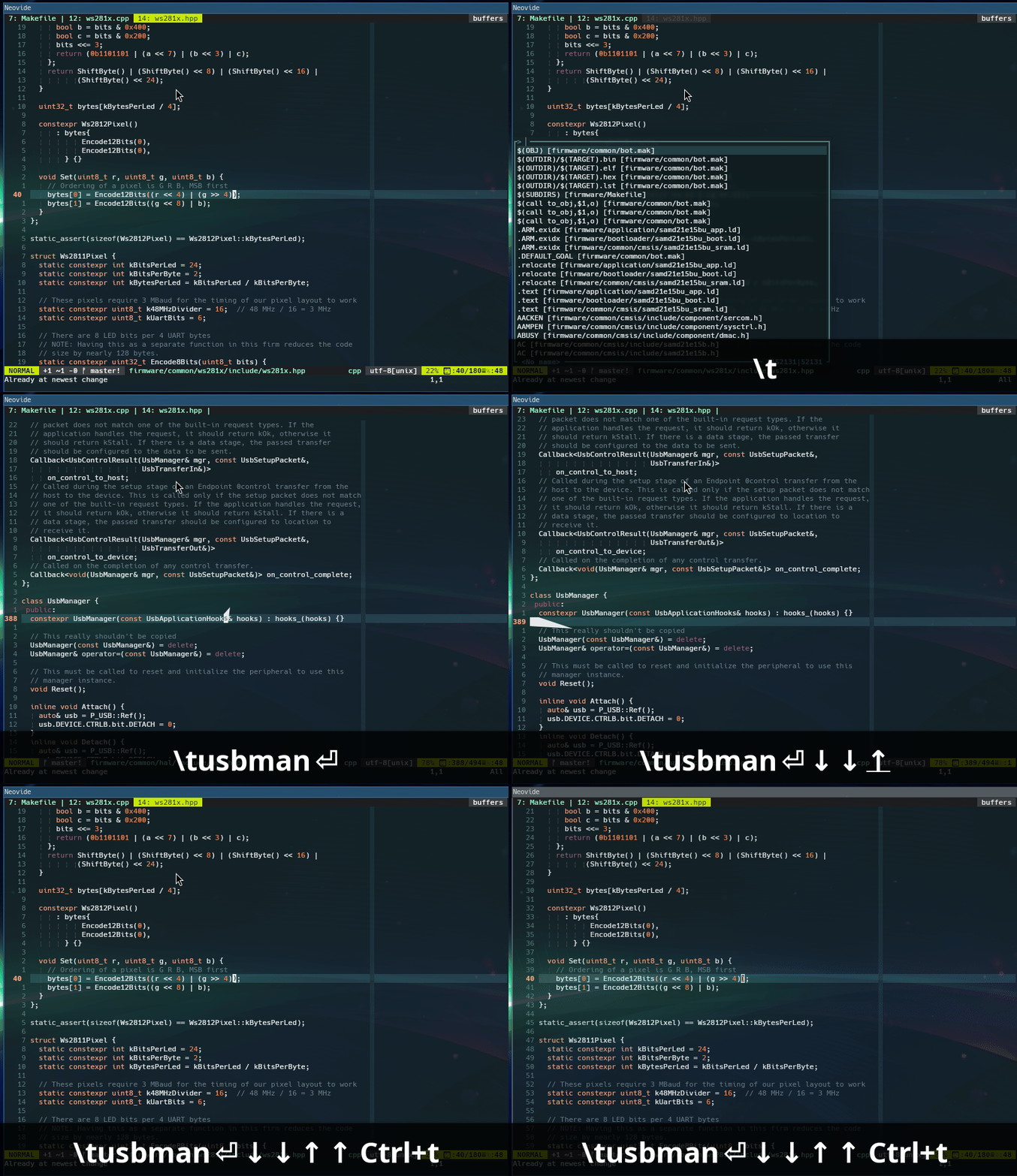
Doing this wasn't too hard, but was more complex than I had originally envisioned. Here is the snippet of my init.lua which does this:
 1vim.keymap.set("n", "<leader>t", function () -- t for tags
 2  local taglist = vim.fn.taglist("/*")
 3  local last_tag = nil
 4  local count = 1
 5  for i, v in ipairs(taglist) do
 6    if last_tag ~= v.name then
 7      count = 1
 8    else
 9      count = count + 1
10    end
11    last_tag = v.name
12    taglist[i] = { text=string.format("%s [%s]", v.name, v.filename), tag=v, matchnr = count }
13  end
14  opts = { source = {
15    items = taglist,
16    choose = function(item)
17      -- I'd love to just use the tag command, but that wouldn't reflect the
18      -- tag we've selected (if there are multiple matches for the tag).
19      -- Instead, we manually implement the move to the tag.
20      -- I'll also note that I had trouble getting getpos to work properly
21      -- using the minipick state so instead we run this function after
22      -- minipick has completed.
23      vim.schedule(function ()
24        local target = vim.fn.win_getid()
25        local curpos = vim.fn.getpos('.')
26        curpos[1] = vim.fn.bufnr()
27        local entry = {
28          bufnr = curpos[1],
29          from = curpos,
30          matchnr = item.matchnr,
31          tagname = item.tag.name
32        }
33        local bufnr = vim.fn.bufadd(vim.fn.fnamemodify(item.tag.filename, ":."))
34        vim.api.nvim_win_set_buf(target, bufnr)
35        local stack = vim.fn.gettagstack(targe)
36        stack.items = {entry}
37        local s = nil
38        vim.api.nvim_win_call(target, function ()
39          vim.cmd(item.tag.cmd)
40          vim.cmd("noh")
41          assert(vim.fn.settagstack(target, stack, 't') == 0)
42          s = vim.fn.gettagstack()
43        end)
44      end)
45    end
46  } }
47  return MiniPick.start(opts)
48end)
In a nutshell, here's what this does when I press <Leader>t (\t by default):
- Get the list of tags. Tags in [n]vim are items which consist of the name of the tag, the file where the tag is located, and the ex-mode command which will move to the tag. Usually the command is a search string (e.g. \^int main()), but it could really be anything.
- Iterate through them and create a mini.pick item with the text to be searched fuzzily formatted like <tag> [<filename>].
- When the item is chosen, open the file (vim.fn.bufadd), navigate to the tag position (vim.cmd(item.tag.cmd) and vim.cmd("noh")), and manipulate the tagstack in the same manner than :tag would.
As you can see in the gif, this is pretty snappy. The example is processing a tagfile with 50k+ items in it. At work I've tested this with 200k+ tag items and it works just fine. I'm sure there are more effective or simpler ways to accomplish this, but this is the most in-depth scripting I've ever done in neovim up to this point and it's immensely satisfying how well it works.
vim
Recent posts
Search through tags with mini.pick in neovimWriting reusable USB device descriptors (and other constant data) with C++ constexpr
Using "access" types and "new" in VHDL
A New Blog
A good workflow and build system with OpenSCAD and Makefiles